"Assistive touch" is what most people search for when they want a floating button on Android - borrowed from the iOS term. There are dozens of apps claiming to do this. Most of them are outdated, ad-heavy, or abandoned. A few are genuinely good.
We tested 6 of the most-downloaded options in 2026 and ranked them honestly - including the downsides of each.
Quick Comparison
| App | Price | Ads | Actions | Shapes / Emojis | Last Updated |
|---|---|---|---|---|---|
| Floatify | Free | None | Many | 100+ shapes + 1,000+ emojis | Active (2026) |
| Easy Touch | Free / subscription | Heavy | ~15 | ~10 | 2024 |
| Assistive Touch for Android | Free | Heavy | ~12 | 5 | 2023 |
| Button Mapper | Free / $1.99 | None | Hardware remap only | - | Active |
| Simple Control | Free | Light | 5 | Fixed | 2023 |
| AssistiveTouch iOS 17 Style | Free | Heavy | ~10 | 3 | 2024 |
1. Floatify - Best Overall
100% Free - No ads - No purchases
Floatify is the newest entry in this category and the most actively developed. It started where the others stopped: modern Android design, no ads, and a level of customization that actually makes sense. Everything is fully unlocked with no payment required.
What it does well:
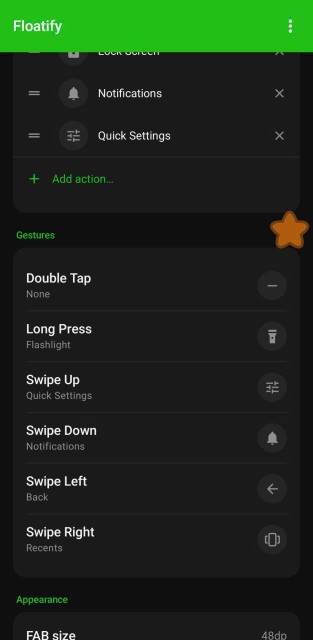
The floating button can be mapped to three gestures independently - single tap, double tap, long press. Each can trigger a different action: screenshot, lock screen, flashlight, WiFi toggle, volume controls, open any specific app, and more. Hold the button to open a menu - radial, vertical, grid, panel, or other layouts - with multiple actions at once.
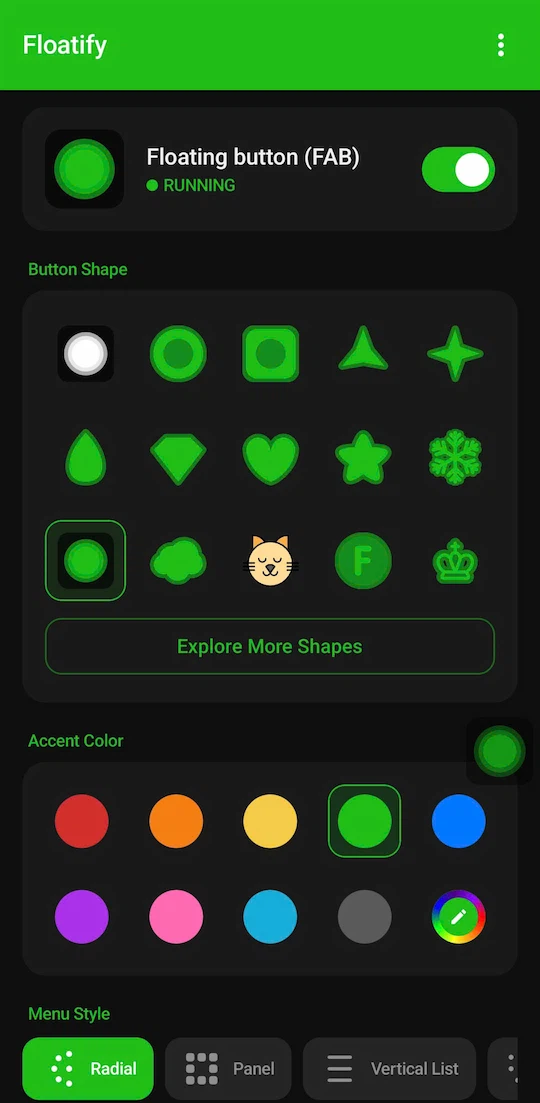
The shape library is a standout feature - 100+ button shapes including geometric forms, animals, fruits, letters, and a full emoji picker with 1,000+ emojis. You can pick any color and adjust size and transparency. It sounds cosmetic, but it means the button can genuinely disappear into your workflow rather than feeling like an intrusion on your screen.
What it doesn't do: It doesn't remap physical hardware buttons (that's Button Mapper's territory). It also can't change system-level settings that require root.
Honest verdict: Best choice for anyone who wants a clean, fully-featured floating button without ads. Everything is free - no catches.
2. Button Mapper - Best for Hardware Button Remapping
Free / $1.99 one-time - No ads
Button Mapper is a different category of app: it remaps physical buttons (volume keys, power button, Bixby key on Samsung) to custom actions. It doesn't add a floating overlay - it changes what your existing hardware buttons do.
Use this if: Your home button works but you want volume-down-double-press to open the camera, or you want to assign a long-press of the power button to the flashlight.
Not this if: You want a visible floating button on screen. Button Mapper doesn't have that.
Solid app, well maintained, no ads. Just a different tool for a different need.
3. Easy Touch - Once Good, Now Dated
Free (ad-supported) / subscription for ad-free
Easy Touch was the gold standard for floating buttons around 2019-2021. It's still the most-downloaded app in this category by sheer legacy traffic, but it shows its age.
The problems: The UI hasn't been updated for Material Design 3. Ads appear on the main screen, inside the floating menu, and sometimes as full-screen interstitials. The "premium" tier moved to a subscription model in 2023 - you pay monthly to remove what used to be a one-time purchase.
What it still does well: It works reliably. The floating button functions correctly, the basic actions are all there, and it handles the permissions flow smoothly on most devices.
Honest verdict: Use it if you need something that definitely works and don't care about ads. But there's no reason to deal with the subscription or ads when Floatify is completely free.
4. Assistive Touch for Android (by EasyTouch Team)
Free (heavy ads)
This is the second-most-downloaded app in the category, often confused with Easy Touch because they share branding history. It's also called "AssistiveTouch" in some listings.
It works, but the ads are aggressive - banners, interstitials between actions, and occasional full-screen rewarded video prompts. There's no paid tier to remove them.
When to use it: When you need a floating button immediately and can tolerate heavy ads. Not for long-term use.
5. Simple Control
Free (light ads)
Simple Control takes a minimalist approach: a small persistent navigation bar (back, home, recents) that sits at the bottom of the screen. No radial menus, no customization, no shapes.
Its strength is simplicity. If you just want to replace a broken home button with the minimum friction, Simple Control gets there faster than anything else. Install, enable, done.
Its weakness: It hasn't been updated since 2023 and may have compatibility issues on Android 14+. Also no customization at all.
6. AssistiveTouch iOS 17 Style Apps (Generic)
There are dozens of apps mimicking the iOS AssistiveTouch bubble. They tend to be visually polished but functionally shallow - limited actions, heavy ads, and minimal customization. They rank well in searches because of their keyword-stuffed names but rarely deliver anything beyond basic functionality.
Skip these unless you specifically want the iOS-lookalike aesthetic.
Which App Should You Choose?
You want the cleanest experience, no ads, full customization: Floatify. It's the most complete option in 2026, and it's completely free.
You want to remap physical hardware buttons: Button Mapper. Not for floating overlays, but excellent at what it does.
You just need a dead-simple home button replacement right now: Simple Control or the Accessibility Menu built into Android.
You already have Easy Touch and it works fine for you: No reason to switch unless the ads bother you.
What to Look for in a Floating Button App
Do you want it for hardware button replacement or productivity shortcuts? If your home button is broken, you need reliable home/back/recents actions. If your buttons work fine, you're probably looking for quick access to screenshot, flashlight, volume - different requirements.
How do you feel about ads? Floating button apps run constantly in the background. An ad-supported one will interrupt you multiple times a day as you use your phone. For a background utility, ads are more disruptive than in a regular app.
Frequently Asked Questions
Are floating button apps safe? Yes. They use the standard Android "Display over other apps" permission (SYSTEM_ALERT_WINDOW). This is the same permission used by Facebook Messenger chat heads, screen recorders, and clipboard managers. The button cannot intercept your passwords, access your camera, or read your messages.
Will a floating button app slow down my phone? Minimal impact. The better apps (Floatify, Button Mapper) use efficient foreground services that consume very little RAM and CPU.
Can I use a floating button on Android 14 and 15? Yes, with caveats. Android 14 introduced stricter rules for overlay permissions, so the setup process has an extra step on some devices. Floatify has been updated specifically for Android 14+ compatibility.
Do these apps work on tablets? Yes. Floatify works well on tablets. The floating button is especially useful on large-screen devices where physical navigation buttons are awkwardly placed.
Also read: Best Floating Button App for Android With No Ads - a focused look at ad-free options only.
Or: Android Home Button Not Working? 5 Fixes - if your hardware home button broke and you need a solution now.
No ads. No sign-up. Works on Android 10+.