The recents button has two completely different failure modes, and people searching for help usually mix them up.
Either nothing happens when you press it, or it opens fine but your apps are gone. Those have separate causes and separate fixes, so start by working out which one you have.
Case A: Nothing Happens When You Press It
The app switcher does not open at all. No animation, no response.
Check you are performing the right gesture
On gesture navigation there is no recents button, and the gesture is genuinely unintuitive: swipe up from the bottom and hold until the cards appear. Swipe up without holding and you go to the home screen instead. A lot of "recents is broken" reports are just a missing pause.
If you would rather have a visible button, switch to 3-button navigation in Settings - System - Gestures - System navigation, or Settings - Display - Navigation bar on Samsung.
Check whether the other buttons still work
If home and back stopped at the same time, this is not a recents problem. System UI has hung, and the navigation bar guide covers the right fix.
Restart, then test in safe mode
A restart clears a hung System UI. If recents still does nothing afterwards, boot into safe mode: hold power, then long-press "Power off" until the safe mode prompt appears.
If recents works in safe mode, an installed app is blocking it - most often a third-party launcher. The app switcher is provided by the system's own launcher package, not by the launcher you install, and setting a third-party launcher as default is a long-standing trigger for recents breaking while home and back keep working. Switching back to the stock launcher for a minute is the test.
Check for a work profile or device admin
On a managed phone, an IT policy can disable the app switcher outright to stop data moving between apps. If your phone is issued by an employer or school and recents has never worked, this is likely the reason and no local setting will override it.
Case B: Recents Opens But Your Apps Are Not There
The switcher appears and is empty, or apps vanish from it within a minute of leaving them.
This is not a fault in the button. Something is clearing your recents list.
Aggressive battery optimisation
This is by far the most common cause, and it is mostly specific to certain manufacturers. Xiaomi, OPPO, Realme, vivo and Huawei ship far more aggressive memory management than stock Android, and it will evict apps from recents very quickly.
Fix it per app:
- Xiaomi / HyperOS: Settings - Apps - Manage apps - pick the app - Battery saver - No restrictions. Also open recents, swipe down on the app card and tap the lock icon to pin it.
- OPPO / Realme: Settings - Battery - App battery management - pick the app - Allow background running
- Samsung: Settings - Battery - Background usage limits - make sure the app is not in "Sleeping apps" or "Deep sleeping apps"
- Stock Android: Settings - Apps - pick the app - Battery - Unrestricted
"Clear recents on lock" style settings
Some skins have an option to clear the app list when the screen locks, or a security setting that hides app previews. Check your battery and privacy settings for anything mentioning clearing recent apps.
Case C: The Card Is There But the App Restarts When You Tap It
A third pattern that gets reported as a broken recents button: the app switcher looks completely normal, every app is listed, but tapping a card reloads that app from its home screen instead of returning you to where you were.
Nothing is broken here. Android keeps the card in the switcher long after it has evicted the app itself from memory - the card is a snapshot, not the running app. Tapping it starts the app again from scratch. On phones with 4GB of RAM or less this happens constantly, because Android drops background apps to keep the foreground responsive. That is the system working as designed, not a bug.
It is most noticeable with browsers losing your open tabs, and with forms or messages you had half typed.
The fix is the same as Case B: stop the system evicting the apps you care about. Set them to unrestricted background usage, and on Xiaomi pin the card with the lock icon so it survives memory pressure. On those low-memory phones, keeping fewer apps open at once is the only thing that reliably helps.
The Permanent Workaround: A Floating Recents Button
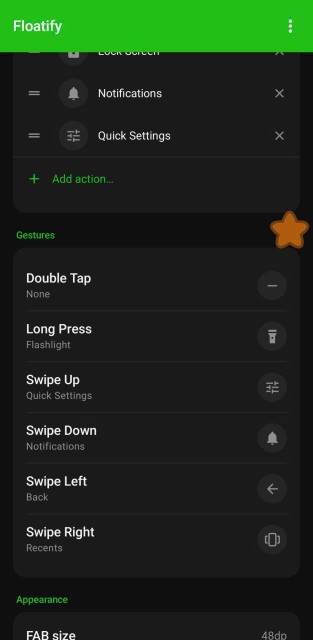
If recents is unreliable because of your launcher, or you simply cannot hit the swipe-up-and-hold gesture consistently, you can put recents on a floating button instead.
A floating button triggers recents through Android's accessibility layer, so it works in any navigation mode without you having to hit the swipe-up-and-hold gesture. Worth knowing where the limit is: the switcher itself is still rendered by the system, so this routes around an awkward gesture or a launcher conflict, not around a frozen system UI.
Floatify is free and ad-free. Assign Recents to any gesture on the button - tap, double tap, long press, or a swipe.
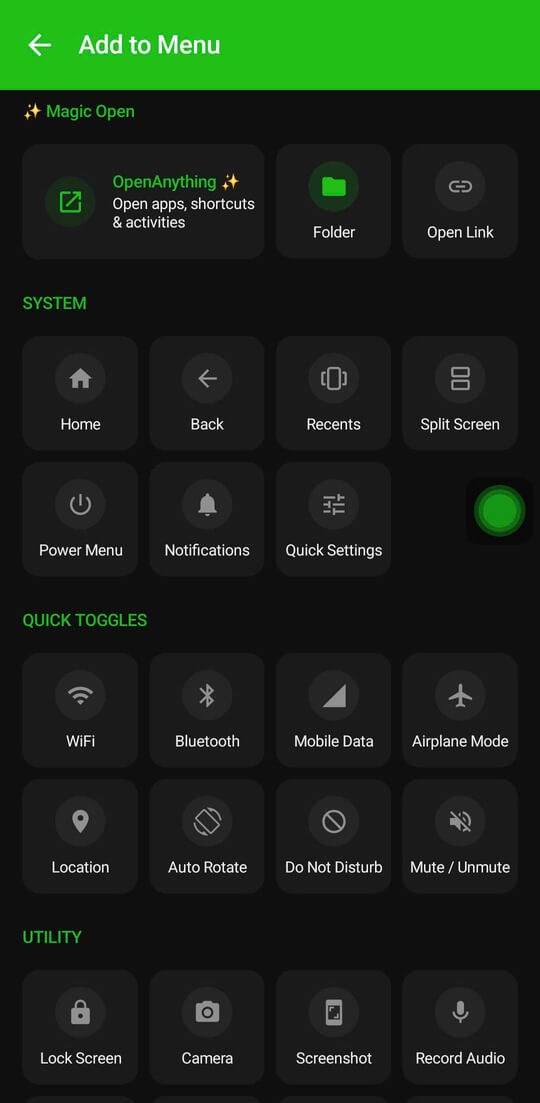
There is a second action worth knowing about: Switch to last app. It jumps straight between the two apps you used most recently without opening the switcher at all. For the back-and-forth pattern that makes up most multitasking, it is faster than recents ever was.
The full setup walkthrough is in Get Recent Apps as a Floating Button on Android.
Frequently Asked Questions
Why is there no recents button on my phone?
You are on gesture navigation, which removes the on-screen buttons. Swipe up from the bottom and hold to open the switcher, or switch to 3-button navigation in Settings.
My recents list clears every few minutes. Is my phone broken?
No. It is battery optimisation evicting background apps, and it is much more aggressive on Xiaomi, OPPO, Realme, vivo and Huawei than on stock Android. Setting the apps you care about to unrestricted background usage fixes it.
Recents stopped working right after I installed a new launcher.
That is a well-known interaction. Setting a third-party launcher as default regularly breaks recents on three-button navigation while home and back are unaffected. Set the stock launcher back as default to confirm, then report it to the launcher's developer - it is their bug to fix, not a fault in your phone.
Does a floating recents button need special permission?
It needs the Accessibility permission, because triggering system navigation is exactly what that API is for. Overlay permission is needed separately so the button can float over other apps.
Is "switch to last app" the same as recents?
No, and it is usually better. Recents shows every app you have open. Switch to last app jumps directly to the previous one in a single tap, with no list to look through.
Also Read
No ads. No sign-up. Works on Android 10+.